DeepSeek Harness plugin

Know what every token costs.

Per-model API prices in USD or CNY, your wallet balance and live session spend — one quiet line under the composer, priced from the session log you already have.

Install from GitHub plugin spec
github:itsbuyru-bit/dsh-model-price

Paste it in Settings → Plugins → Add plugin, then restart DeepSeek Harness and refresh the page. There is no npm package.

Composer line showing token throughput, cache hit rate, session cost with a Peak badge, wallet balance and a live indicator.
The composer line: live session cost, wallet balance and the current Peak / Off-Peak tariff.

Screenshots

Every number, one click deep.

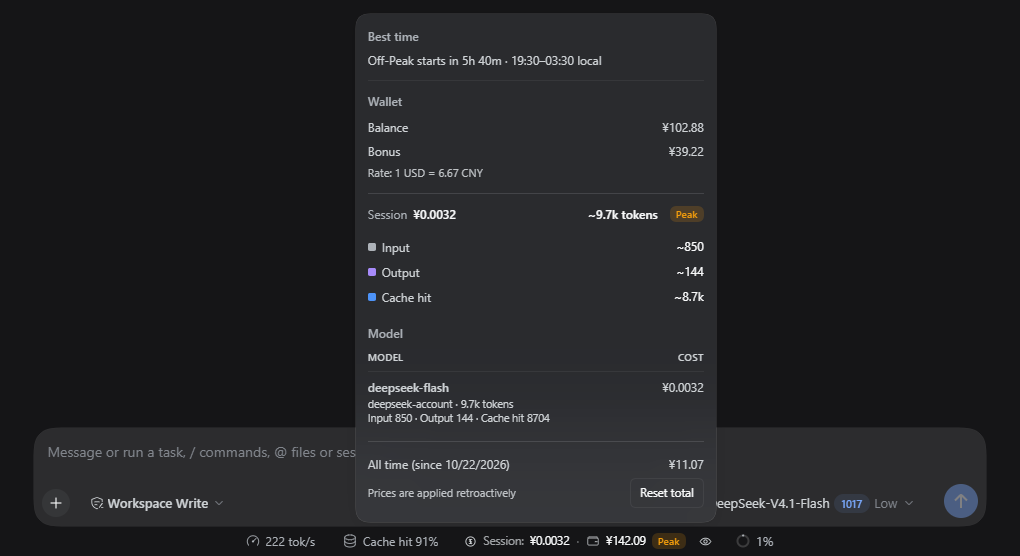
The line stays quiet until you need it. Open the popover for token composition, per-model cost, the wallet split and your all-time total — then set the rates that produce them.

Spend popover with best time, wallet balance and bonus, session token composition, per-model cost and the all-time total. Opens the full-size screenshot in a new tab.
Spend popover Token composition, cost per model, the wallet split and the all-time counter. Price edits recalculate the visible history. View full size
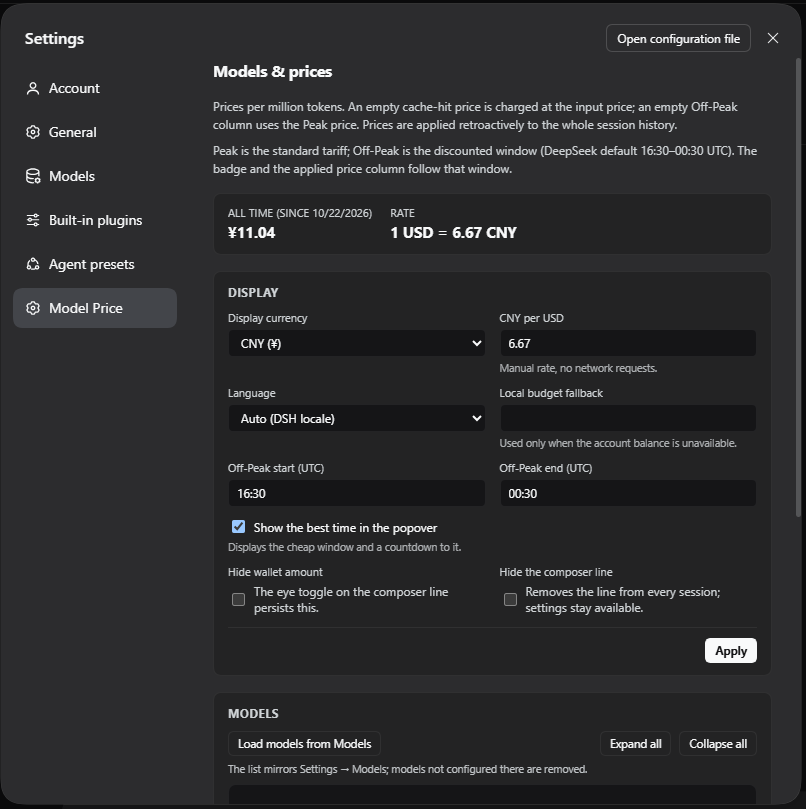
Settings — Display: display currency, manual FX rate, local budget fallback, Off-Peak window, language and visibility toggles. Opens the full-size screenshot in a new tab.
Settings — Display Display currency, manual rate, local budget fallback, the UTC Peak schedule and the plugin language. View full size
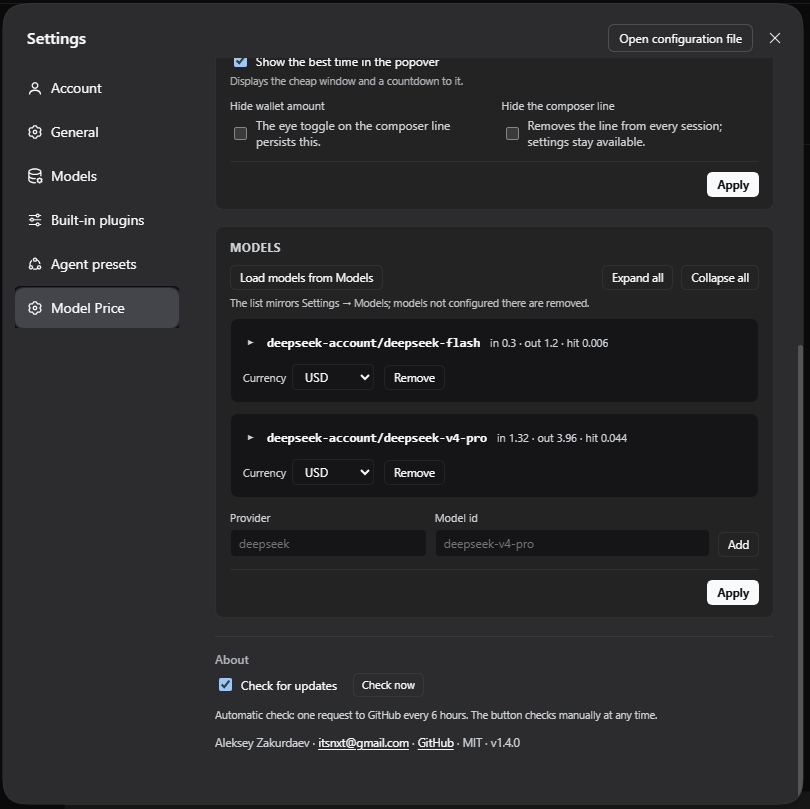
Settings — Models: imported model rows with USD prices, Add / Remove controls and the About block with the update check. Opens the full-size screenshot in a new tab.
Settings — Models Mirror the models bound in Settings → Models, then enter input, output, cache-hit and cache-write prices per 1M tokens. View full size

Features

Pricing that matches how you actually pay.

Built from the durable session log. Nothing is estimated, nothing is rewritten and nothing blocks a request.

Per-model pricing, Peak and Off-Peak

Input, output, cache hit and cache write, each with a Peak and an Off-Peak rate. Editable UTC windows and weekdays pick the column — DeepSeek’s Peak is 01:00–04:00 and 06:00–10:00, Monday–Friday, excluding Chinese holidays.

Two currencies, one manual rate

Enter prices in USD or CNY, display in either and convert with a manual FX rate stored in your settings. No exchange-rate service is ever called.

Wallet with bonus wallets

The real DeepSeek account balance plus bonus wallets, split in the popover. When the account is unavailable, a local budget can stand in.

Live session cost

Updates while the model works. Retried steps are de-duplicated, aborted steps without usage are reported rather than guessed, and unpriced models show ?.

Sync from Settings → Models

One click mirrors the models bound in Settings → Models. A provider with an empty list contributes nothing, and a model removed there leaves the price table with its prices.

Nine languages

English, Russian, Chinese, Japanese, Korean, Spanish, Portuguese, German and French — discovered from locale files and switchable independently of Harness.


How it works

Three steps from install to insight.

  1. Add your models

    Open Settings → Models & prices and press Load models from Models, or add a provider and model id by hand.

  2. Set your prices

    Expand a row and fill the input, output, cache-hit and cache-write prices per million tokens for Peak and Off-Peak, then press Apply.

  3. Read the line

    Session cost, wallet and the current tariff sit under the composer. Click the line for tokens, per-model cost and the all-time total.

Languages

Nine locales, one plugin.

The plugin language is independent of Harness and can be overridden per plugin. Missing keys fall back to English, key by key.

Read the translation guide on GitHub
  • en-USEnglish
  • ru-RUРусский
  • zh-CN简体中文
  • ja-JP日本語
  • ko-KR한국어
  • es-ESEspañol
  • pt-BRPortuguês (Brasil)
  • de-DEDeutsch
  • fr-FRFrançais